While your employees are working hard for your business, hackers are hard at work trying to get your sensitive data. One of the most common tactics is phishing: emails that pretend to come from someone you trust, designed to trick people into handing over information. These attacks are expensive, averaging $4.5 million per data breach. Small businesses are at risk too. One often-quoted figure says 60 percent of small businesses hit with cybersecurity attacks go out of business within six months. Protecting your company starts with the most basic step: making sure your employees know what to look for.
This guide covers both halves of phishing protection: building an employee training program, and the technical controls that catch what people miss.
Why Employee Training Matters

Modern cybersecurity includes good firewalls, smart antivirus software, and strong encryption. Phishing goes around all of that by targeting people instead. One click on the wrong link can let an attacker in, however good your technology is.
So stopping phishing means teaching your employees what it looks like, how to avoid it, and what to do when they spot it. Staff who know what to watch for are one of your best defenses.
Even if your staff have had training before, refreshers help. Phishing emails today look different from, and more convincing than, the ones people were warned about a few years ago. Regular training keeps everyone current.
How To Create An Effective Security Awareness Training Program

In order to develop a workforce that can effectively shut down phishing attacks, your employee training program needs to include a number of components that educate and equip your employees for whatever comes their way. Here is a look at some of the most important pieces to have in your program:
Understanding Phishing
While many employees may know what phishing is, many will not. Lay the groundwork for your training by explaining what phishing is. Use real-life examples if possible and make sure to highlight the forms that phishing can take, such as these:
- Email Phishing: Emails that appear to be from trusted sources.
- Spear Phishing: Attacks targeted to specific employees.
- Whaling: Attacks that target high-level executives.
- Smishing and Vishing: Phishing attacks that use text messages and phone calls. AI voice cloning makes phone scams harder to spot, so see our vishing protection guide.
- Clone Phishing: A copy of a real email you already received, with the link or attachment swapped for a malicious one.
- Business Email Compromise (BEC): An attacker uses a hijacked or look-alike mailbox to request payments, gift cards, or changed bank details.
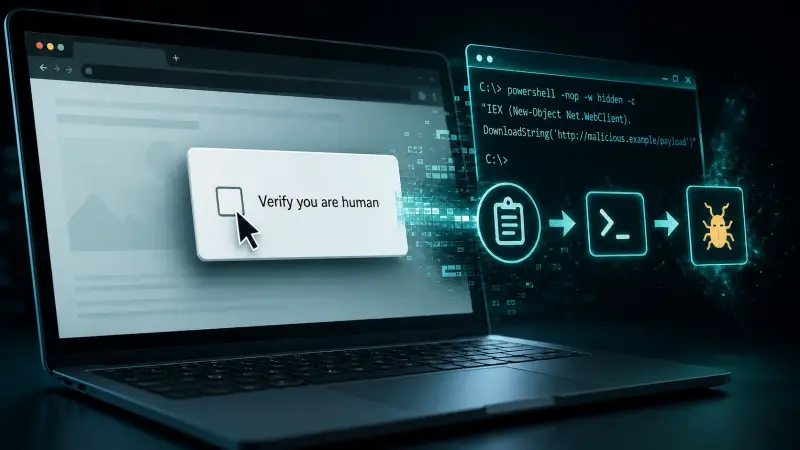
Newer tricks skip email attachments completely. ClickFix fake CAPTCHA attacks talk people into pasting and running a malicious command themselves.
Recognizing Red Flags
Phishing attacks can be sophisticated, but there are red flags employees should be aware of:
- Unexpected Emails: Especially if these emails ask for sensitive information.
- Generic Greeting: That does not use the recipient’s name.
- Spelling and Grammar Mistakes.
- Urgent Language: Or even threatening language intended to create a sense of panic.
- Suspicious Links: Emails that ask recipients to open links or attachments.
Practicing Safety
Equip your workforce with tools to handle phishing attempts:
- Verify the Email Address: Employees should examine the sender carefully.
- Check URLs: Employees should hover their cursors over links to see the real URL.
- Double-check with Sender: If there is any question about an email’s validity, the employee should check with the sender directly.
- Report Suspicious Emails: Establish a protocol for reporting phishing attempts. Usually this report should be made to the IT department.
Regular Training
Phishing keeps changing, so training should be a regular habit, not a one-off. Simulated phishing emails are a good way to see who would have clicked and who needs a refresher.
Creating Open Communication
Security should be everyone's job, and people should feel comfortable saying "I think I clicked something." Recognize the employees who spot and report phishing attempts.
Back Your Team Up With Technical Controls
Training lowers the odds that someone clicks. It will never get them to zero, so put controls in place that stop most phishing before it reaches an inbox and limit the damage when something slips through.
Turn on multi-factor authentication
MFA means a stolen password alone is not enough to get into email, banking, or cloud apps. Use an authenticator app or security key where you can. Text-message codes are better than nothing, but they are easier to intercept.
Filter email before it reaches people
A good email security service scans links and attachments, flags look-alike domains, and quarantines likely phishing so employees never see it.
Set up SPF, DKIM, and DMARC
These email authentication records make it much harder for attackers to send mail that pretends to come from your domain, and they help receiving servers reject spoofed messages.
Keep software and browsers updated
Many phishing links lead to pages that exploit old software. Regular patch management closes those gaps.
Block known-bad websites
DNS or web filtering stops devices from reaching known phishing and malware sites, even after someone clicks.
Verify payment and account changes out of band
Any request to change bank details, send a wire, or buy gift cards should be confirmed by phone, using a number you already have and not one from the message.
How Spot On Tech Helps
Spot On Tech runs employee cybersecurity training for businesses of all sizes. Systems Engineer Keith Willse also leads our webinar Cybersecurity in the Time of Hybrid Work, which covers what your team needs to know about staying safe while working from anywhere.
Beyond training, we can take over all of your technology so you can focus on running the business. Take a look at our services and let us know if you'd like to talk.